Zoom Workplace CVE-2026-108186: Windows clients before 7.1.8 need an update
Zoom published two security bulletins for Zoom Workplace for Windows on November 10. The critical one, ZSB-26023, is CVE-2026-108186: improper input validation that may let an unauthenticated attacker escalate privileges over the network. It’s scored 9.6. The CVSS vector says a user has to do something for it to work. Zoom’s own offensive security team found it. The second, ZSB-26024, is CVE-2026-108187, an origin validation error scored 8.1. Zoom hasn’t said either one is being exploited.
Which versions are affected
| CVE | Severity | Affected Zoom Workplace for Windows |
|---|---|---|
| CVE-2026-108186 | Critical, 9.6 | 7.1.0 up to, but not including, 7.1.8 |
| CVE-2026-108187 | High, 8.1 | everything before 7.1.5 |
7.1.8 or later fixes both. A computer on 7.0.x isn’t affected by the critical one. It is affected by CVE-2026-108187 and needs the update too.
Add/Remove Programs drops the patch number
I put Zoom 7.1.5 on a Windows 11 Pro lab VM with the MSI, and this is what Windows recorded:
| Where | What it says |
|---|---|
Add/Remove Programs (DisplayVersion) | 7.1.43453 |
C:\Program Files\Zoom\bin\Zoom.exe (file version) | 7.1.5.43453 |
Add/Remove Programs keeps the major version, the minor version and the build number. It leaves out the patch number. 7.1.5 shows up as 7.1.43453. 7.1.8 shows up as 7.1.46825. An inventory report or detection rule that compares 7.1.43453 to 7.1.8 sees 43453 as higher than 8 and marks the machine fixed. It’s still on 7.1.5 and still vulnerable.
Zoom.exe has the full version. Read that one. Without Zoom.exe, compare the registry’s build number within the same major and minor version. Builds go up within a line like 7.1. They don’t go up across lines. My own desktop runs 7.1.9, build 48550, a higher build than 7.2.0’s 48358. These are the builds I checked against Zoom’s own download links:
| Zoom Workplace | Build | CVE-2026-108186 | CVE-2026-108187 |
|---|---|---|---|
| 7.0.5 | 38856 | not affected | vulnerable |
| 7.1.0 | 41345 | vulnerable | vulnerable |
| 7.1.5 | 43453 | vulnerable | fixed |
| 7.1.8 | 46825 | fixed | fixed |
| 7.2.5 | 51704 | fixed | fixed |
Per-user installs write the version a third way. A user who installs Zoom themselves gets it in %APPDATA%\Zoom\bin. It registers in their own hive as ZoomUMX with a DisplayVersion like 7.0.5 (38856). An inventory that runs as SYSTEM and only reads HKLM never sees that copy.
What I found in the lab
All of this was on the Windows 11 Pro VM, running each installer the way a deployment tool does, as SYSTEM.
- Zoom 7.1.5 installed machine-wide came back vulnerable to CVE-2026-108186. The 7.1.8 MSI upgraded it in place. The check then came back fixed.
- I installed 7.0.5 per user, as the signed-in user with no admin rights. The first time, nothing installed: the per-user installer saw the machine-wide MSI copy and just opened that one. Its log says
CheckAndLaunchMSIBinary ... Found MSI products, count:1. The per-user install worked once I removed the machine-wide copy. It landed in AppData. - With the per-user 7.0.5 still there, I deployed the 7.2.5 MSI machine-wide as SYSTEM. It removed the per-user copy, both the files and the user’s
ZoomUMXentry. That user was signed in at the time. I didn’t test a user who was signed out.
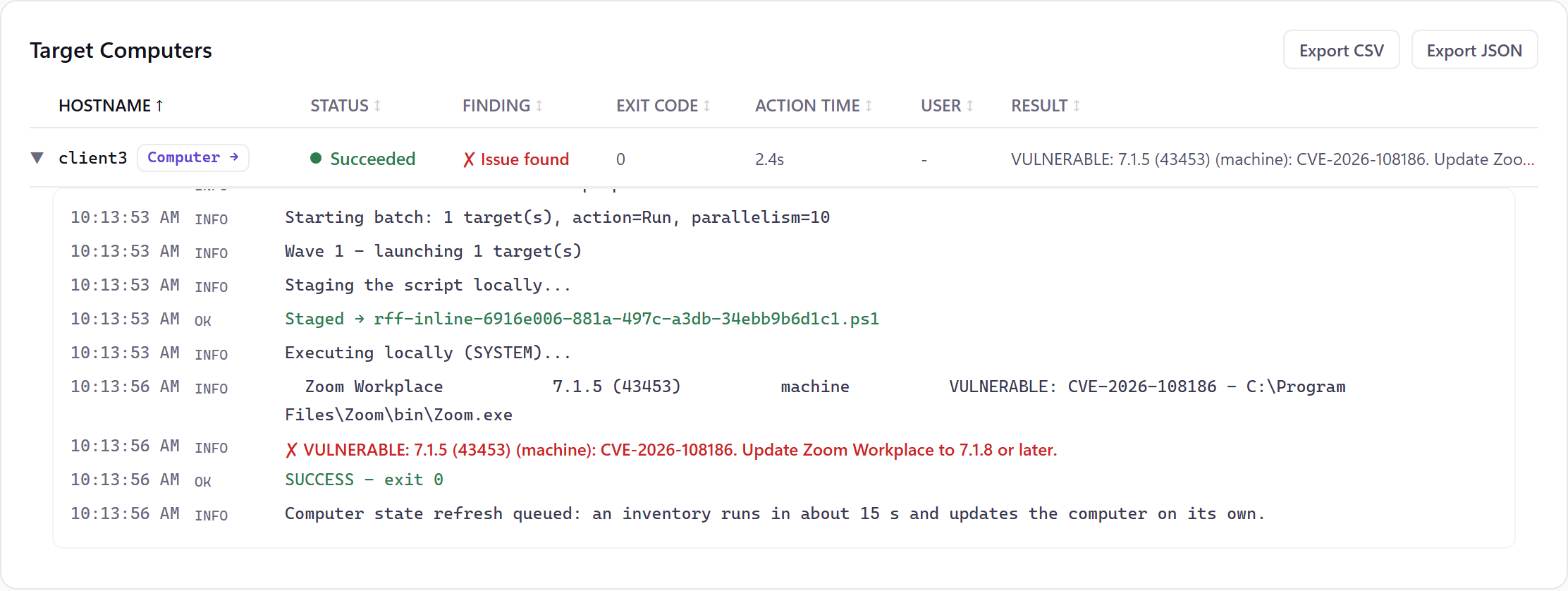
Then I ran the RFF check on a staging computer with 7.1.5:
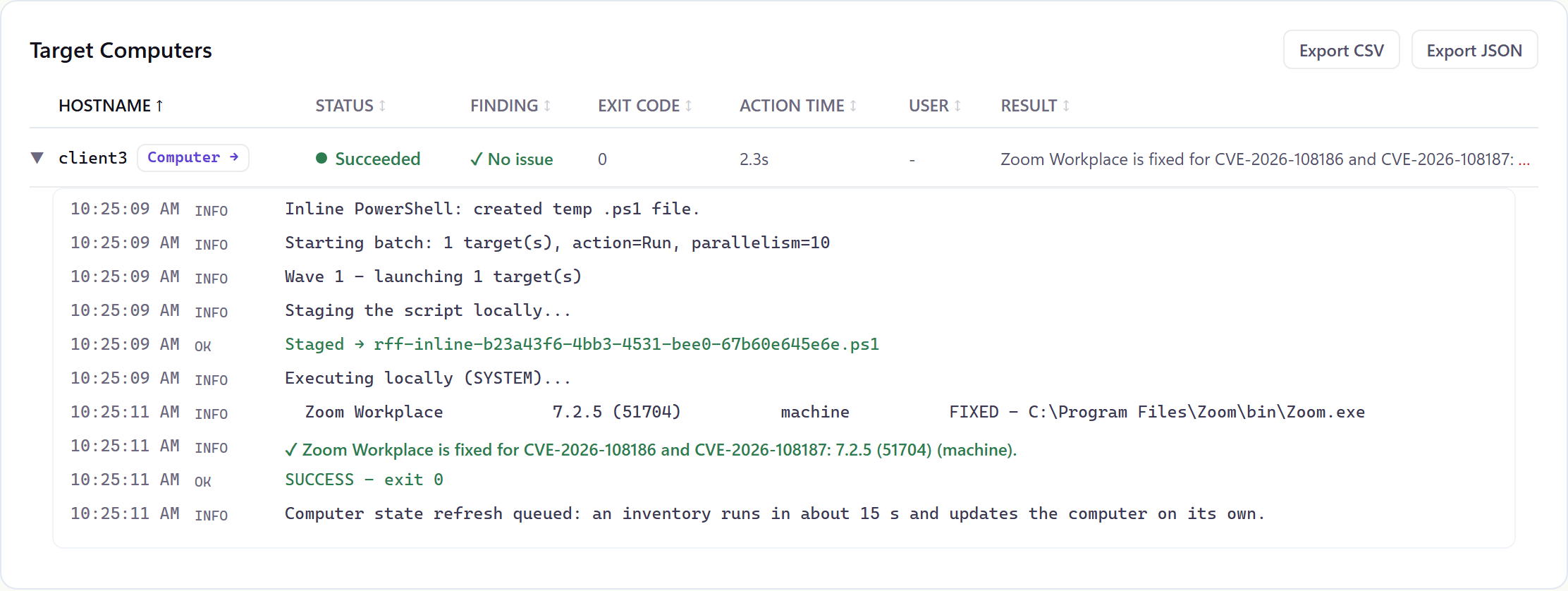
And again after deploying the current Zoom MSI to it:
Check one machine
In PowerShell, as an admin, this lists every Zoom.exe with its full version, machine-wide and in every user profile:
$paths = @('C:\Program Files\Zoom\bin\Zoom.exe', 'C:\Program Files (x86)\Zoom\bin\Zoom.exe') +
    (Get-ChildItem C:\Users -Directory | ForEach-Object { Join-Path $_.FullName 'AppData\Roaming\Zoom\bin\Zoom.exe' })
$paths | Where-Object { Test-Path $_ } |
    ForEach-Object { [pscustomobject]@{ Path = $_; Version = (Get-Item $_).VersionInfo.FileVersion } }
Go by the version on Zoom.exe, not the one in Add/Remove Programs. Anything below 7.1.8.46825 needs the update.
What to do
- Update every Zoom Workplace for Windows install to 7.1.8 or later. For a fleet that’s the machine-wide MSI (
ZoomInstallerFull.msifrom Zoom’s download center), installed withmsiexec /i ZoomInstallerFull.msi /qn. The SwitchHunt entry for Zoom has the lab-tested install and uninstall lines and Zoom’s documented MSI options. - Look for per-user copies in
%APPDATA%\Zoomon every profile. In the lab the machine-wide MSI removed the signed-in user’s copy. Check the other profiles afterwards.
Doing it with RFF
The RFF Script Library has a version check for these two CVEs on Windows. It reads Zoom.exe’s file version machine-wide and in every user profile, whether the user is signed in or not. It only falls back to the Add/Remove Programs entry where there’s no Zoom.exe. It reports each copy as fixed or vulnerable and names the CVE that applies. I tested it on lab VMs with Zoom 7.0.5 per user and with 7.1.5, 7.1.8 and 7.2.5 machine-wide. The two screenshots above are that check, run from the Script Library on a staging computer. Zoom Workplace in the RFF software library installs the current Zoom MSI from zoom.us. Deploy it to every computer the check flags.
RFF is free for your first 100 endpoints: getrff.com.
Sources
- Zoom security bulletin ZSB-26023: CVE-2026-108186, Critical 9.6, CVSS vector, affected 7.1.0 to before 7.1.8, published November 10, 2026
- Zoom security bulletin ZSB-26024: CVE-2026-108187, High 8.1, affected before 7.1.5
- Zoom security bulletins: both listed on November 10, neither marked as exploited
Comments
Comments use GitHub Discussions, so you'll need a GitHub account to post. Corrections are especially welcome.