Windows RMM,
really freakin'
fast.
Windows is full of surfaces that punish the admin - GPO, patching, dsregcmd, silent installs. RFF wraps each one in something you can actually read, and tells the truth about the edges. Deploy, monitor, remediate and remote-control your Windows, Mac and Linux machines from one fast console.
Look up a CVE and get the fix, not just the score.
Most catalogs tell you a CVE is critical and stop. For Windows, ours also carries the update that fixes it and the build revision that actually carries the fix - the part that decides whether you're patched.
What's the silent switch?
Drop any Windows installer into SwitchHunt. It reads the file in your browser (nothing is uploaded), names the engine, and gives you install, uninstall and repair commands.
Three architectural choices. That's it.
Most RMMs were built when "the cloud" meant a VM in someone else's basement. RFF was built in 2026. The difference shows up in three places.
Parallel by default, not by exception
Most tools deploy serially or in tiny "batches of 5" because the underlying transport (SMB, PSExec, WinRM) opens a session per machine and chokes on handshakes. RFF agents pull work over outbound 443 - every endpoint self-fetches in parallel. 500 machines start together; they finish together.
Packages live at the CDN edge
Your MSI doesn't get copied 500 times from your repository server. It gets uploaded once to R2, cached at Cloudflare's edge near each endpoint, and pulled from there. A 250MB installer landing on 500 endpoints saturates the edge, not your office's upload pipe.
Agentless when you need it, agent when you don't
Most cloud RMMs are agent-only - every host needs a service installed before it can be touched. RFF can also reach machines agentlessly (SMB + WMI) for one-off pushes or onboarding the next 300 endpoints without a rollout. Install the agent when you want speed; don't when you don't.
Three steps. Then go do something else.
The agent does the heavy lifting over 443. You point and click. Or write a cron string. Whatever you're into.
Install the agent
A signed agent for Windows, Mac and Linux. Communicates over 443. Auto-updates. Done in eight minutes across your fleet.
→ one-line install from /devices Point at machines
Dynamic groups - by OS, installed software, last seen, or AD OU - or plain manual selection. "Machines WITHOUT Chrome" recomputes itself every run.
group: Machines WITHOUT Chrome Hit deploy
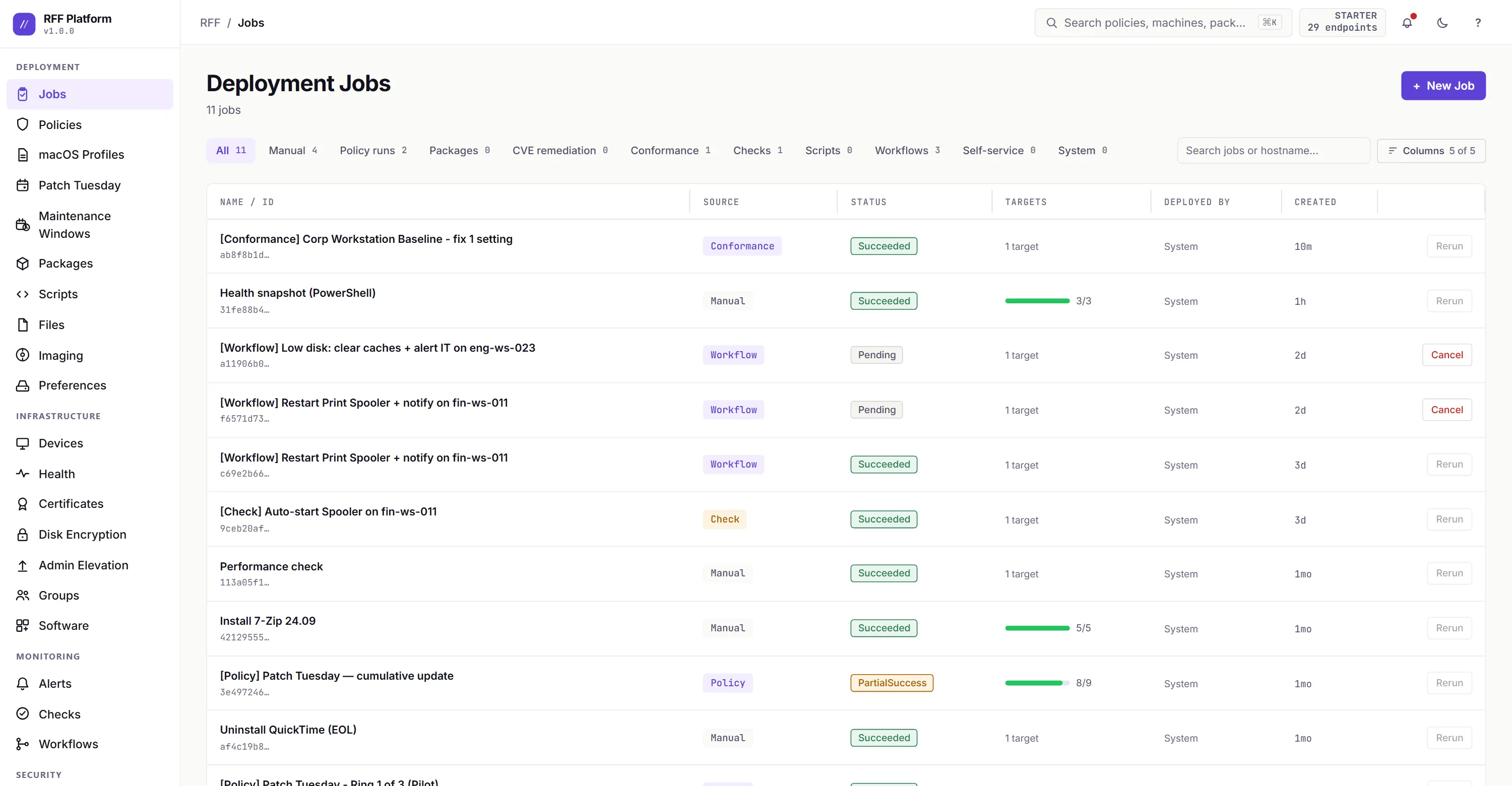
Run as SYSTEM, current user, or specific creds. Stagger by N machines. Schedule it. Walk away.
parallelism: 50 · timeout: 300s Features the big guys can't be bothered to ship.
Built by an admin who got tired of writing PowerShell wrappers around their RMM.
Run as current user
Need a deploy that respects HKCU and the user's mapped drives? Cool. RFF actually does that. Most don't.
Staggered patching
Patch Tuesday in rings: pilot 10%, soak, health-gate - then the fleet. A bad ring auto-halts before it spreads. Saved-bacon mode.
Human-readable scheduling
"Every Tuesday and Thursday at 2:30 AM" instead of `30 2 * * 2,4`. Cron picker for the brave.
Dynamic groups
Target "Machines WITHOUT Chrome" and the group recomputes every run. Compliant machines exit automatically.
Run-as-SYSTEM (still)
Yes, RFF can also run as SYSTEM. We're flexible like that.
PowerShell, MSI, EXE, anything
Drop a script, drop a package, drop a one-liner. RFF doesn't care. It just runs.
Role-based access
Start with admin, operator or viewer, then build your own: a base role minus the privileges you don't want it to have, like revealing a BitLocker key or taking a screen. Role changes are admin-only and audited.
Monitoring that tells you
Recurring health checks on a schedule: a service up or down, disk free under a threshold, Defender healthy, reboot pending, a process running, a registry value, an event-log match, a script's exit code, EDR alive. A failing check opens an alert and routes it by email or webhook. "Service not installed" isn't a failure by default, so you don't drown in noise.
Checks that fix themselves
A check can self-heal: "always keep the spooler running" restarts it the moment it's found stopped. Need more than a restart? A workflow runs a sequence - PowerShell, service control, whatever - on the device that failed, with a cooldown and an attempt cap so it never thrashes.
Fix it without taking the screen
Sometimes you don't need the desktop. Live Manager is Task Manager in the browser - processes, services, and shared folders for any device, sortable, with service control. Open a background SYSTEM shell (admin-only, transcript kept), browse and edit the registry, or browse, download, and upload files. All remote, none of it interrupting whoever's working.
Drive mappings, the GPO way
GPP-style network drive maps, reconciled in the user's real session and targetable by device group or by user / AD security group. The one thing Intune made harder than Group Policy did - mapped drives - back to simple.
Conformance + CIS baselines
Capture a golden box or seed a CIS-aligned baseline, edit it as a versioned desired-state document, and RFF flags every machine that drifts - in plain English, down to which GPO set each value. Detect, enforce (approval-gated), or fix and roll back in a click.
How Conformance works →Brick-safe Secure Boot cert rollout
Microsoft's 2023 Secure Boot certs (KB5068202) can leave a box unbootable if you rush them. RFF rolls them in rings with a soak and a brick canary: a machine that goes dark after the cert write halts the whole rollout on the spot, before the next ring fires. Off until you opt in - the dangerous button comes with a guard.
Compliance dashboard
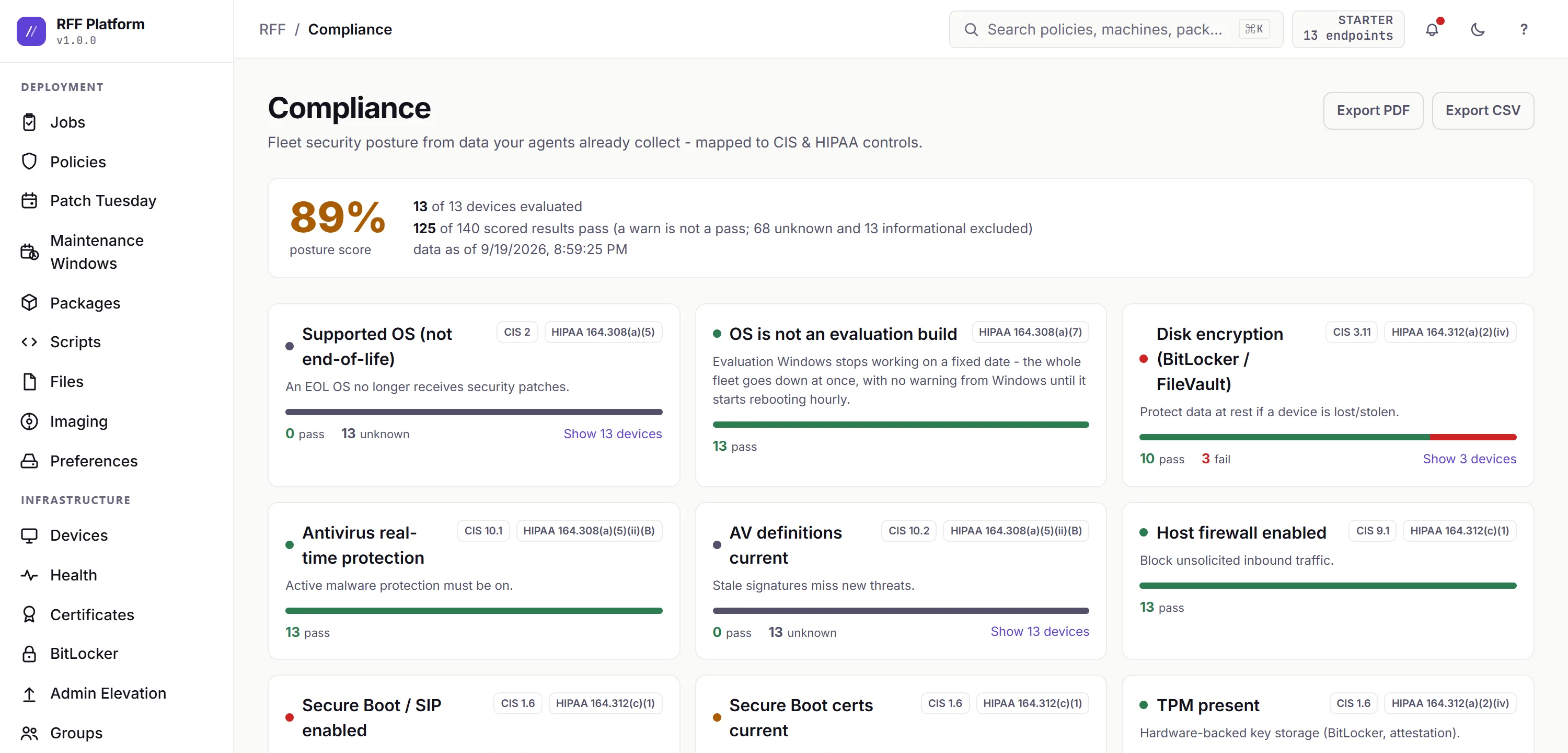
EOL Windows, missing AV/EDR, expiring certs, unlocked screens, BitLocker encryption state - fleet posture on one screen, with the thresholds you set. Click any number through to the exact machines.
Compliance report in one click
Export the fleet compliance report to PDF or CSV for the auditor who asked. No screenshotting dashboards at quarter-end.
Scan, fix, re-check
NVD + CISA KEV matched daily against your inventory, then deploy the fix and re-scan until it clears. Can't patch it yet? Suppress with a reason and an expiry.
Shadow-AI visibility
FreeSee every AI tool, local model, and browser extension on your fleet - including the local runners (Ollama, LM Studio) your network tools structurally can't. Content-blind: identity and metadata only, never a prompt. Detection, sanctioning and removal are on every plan, Free included.
Shadow-AI, in depth →Self Service, JAMF-style
FreePublish apps to a catalog in your users' system tray - they install without a ticket, and RFF deploys it as a normal audited job with install-state read from real inventory. A native tray app, not a web portal, branded with your name, logo, and colors so it reads as YOUR IT.
Meet the Companion →"Why is this machine slow?"
FreeOne click samples the box for 60 seconds and answers in plain English: disk-bound, memory-starved, CPU, or network - and which process is doing it ("it's the Defender scan"). The agent also keeps 14 days of minute-by-minute history on the machine - never uploaded - so you can ask "why WAS it slow this morning" hours after the ticket. Free on every plan.
True multi-tenancy for MSPs
Each client is a hard-walled tenant - database-level isolation, not a device-group folder. Switch between clients from one login, pool endpoint licensing across them, and brand each client's end-user surfaces with their own logo and colors (MSP).

When you just need to be on the box.
Live, attended remote control of a Windows, Mac or Linux machine - right in the browser. Their screen, your mouse and keyboard. No VPN, no jump box, no inbound holes. The boring feature every fleet eventually needs, built the way the rest of RFF is.
See the screen. Take the keyboard.
Drive the signed-in user's desktop in smooth H.264 video - not a JPEG slideshow - across every monitor. Move files both ways, push your clipboard over, send Ctrl+Alt+Del or Alt+Tab. Or flip to view-only and just watch over their shoulder.
Drive the login screen itself.
Nobody signed in is the case most tools give up on. RFF can reach the real Windows logon screen as SYSTEM and sign in for you - so a box sitting at the login prompt before anyone's at their desk isn't a dead end. Opt-in, per tenant. On a Mac, unattended access reaches the lock screen and unlocks it; the login window is coming.
Same 443. No new attack surface.
The agent reaches out for the session over the same outbound HTTPS it already uses for deploys. Nothing new starts listening on the endpoint - no port to forward, no VPN to stand up, no inbound hole to explain to your security team.
The user sees you. So does the log.
Attended sessions show the user a consent prompt, then a persistent "you're being controlled" banner with a panic key to cut it instantly. Every session is written to the audit trail - who connected, which machine, how long. Unattended access stays off until an admin turns it on.
Attended control is free on every plan, and so are unattended (nobody signed in) and driving UAC-elevated windows - both stay off until an admin opts the tenant in. Free caps scale, not capability: 2 hours a month and one session at a time. In beta while we harden the transport for the most locked-down corporate networks.
How we drive the login screen →We're asking for the keys. Here's the lock.
Stored credentials, MFA secrets, and privileged actions across every machine - that's real power to hand a young product. We don't take it lightly, and we don't hide how it works.
Encrypted - keys and all
Credential passwords and MFA secrets are encrypted at rest. The key ring that protects them is itself encrypted, wrapped in an X.509 certificate - so a leaked database backup doesn't hand anyone your credentials.
Refuses to boot unprotected
If that key-wrapping certificate isn't in place, RFF won't start in production rather than quietly fall back to plaintext keys. Protection you can accidentally turn off isn't protection.
Tenants split by the database itself
Tenant isolation is enforced with PostgreSQL row-level security on every tenant table - the database refuses to return another client's rows even if application code gets it wrong. Not merely hidden in the UI.
Plus a full audit trail of every privileged action, TLS end to end, and outbound-only agents that open no inbound holes - with a straight account of what we do and don't claim.
Read how we secure it →Priced for real IT teams.
Every plan has every feature (multi-client separation is the MSP plan). The price only goes up with the number of endpoints you manage. The prices are on this page, there's no sales call, and you pay month to month.
- ✓ Every RFF feature - deploy, patch, monitor, alert, remediate, remote
- ✓ Capped at 100 machines - that is the only catch
- ✓ 5 GB package storage
- ✓ Your branding on the end-user surfaces
- ✓ Remote desktop up to 2 h / month
- ✓ REST API - 60 req/min
- ✓ Single tenant, multiple users
- ✓ Email support - the founder answers
- ✓ No endpoint cap - Free stops at 100 machines, this does not
- ✓ $2.00/endpoint above the first 100
- ✓ 500 GB package storage - 100x Free
- ✓ Unlimited remote desktop - Free gives 2 h/month
- ✓ REST API - 120 req/min, double Free
- ✓ Still one organization - see MSP for client separation
- ✓ Email support
- ✓ Everything in Starter
- ✓ $149 base + $1.75/endpoint - volume rate
- ✓ Multi-tenant separation (partner console + Sites)
- ✓ Per-client branding, not just your own
- ✓ Unlimited package storage
- ✓ REST API - 600 req/min
- ✓ Quarterly billing available - ask us
The questions you were about to ask.
How is RFF different from NinjaOne or Action1?
Can I see it without installing anything?
Why 443 only? My security team will ask.
Does it really run as the current user?
Can I remote into a machine to fix it?
I'm an MSP - can I manage multiple clients?
What does "self-service" mean here?
What exactly does the agent install?
What about macOS, Linux, phones?
What happens after the 14-day trial?
Your agent is exactly what ransomware crews abuse. Why should I trust it?
You're a one-person company. What if you get hit by a bus?
What if your service goes down, or a machine is offline?
How long until I am actually running?
Stop scheduling deploys
around your week.
Free for 100 endpoints, forever. No card. No call. Install the agent, push some software, see for yourself.