CVE-2026-97631 and PXE boot: how to find the machines it can reach
On October 22 TianoCore published GHSA-99cj-7hg9-mp4m, a bug in the PXE driver of EDK II. EDK II is the open-source reference code that AMI, Insyde, Phoenix and Microsoft’s Project Mu build their UEFI firmware on, which is why the headlines say “most servers on the planet”. It’s rated 9.5 (CVSS 4.0), and it was found by Alex Matrosov (Anthropic) and Dan Holmes-Mitra (Google).
The fix was merged into EDK II on October 15. That doesn’t help you yet: every firmware vendor has to pull it into their own firmware and ship an update, and the advisory still says “Not patched currently”. Intel says that, as far as it knows, its supported products aren’t affected, but it doesn’t rule out manufacturers having built the vulnerable code into their own firmware.
So for now there’s nothing to install. What you can do is find out which machines are exposed, and that turns out to be a much shorter list than “every server”.
The bug only exists while the machine is PXE booting
The driver is UefiPxeBcDxe. While a machine network-boots over IPv4 or IPv6, it copies any ICMP error message it receives into a 504-byte field, and both the IPv4 and IPv6 handlers get the bounds check wrong. An attacker who can get one oversized ICMP error to the machine at that moment corrupts the memory next to it. At minimum the boot hangs. With knowledge of the exact firmware build, the attacker runs code before Secure Boot or the TPM have done anything, so neither of them helps.
No login, no user action. But the advisory’s own preconditions are that the machine is actively PXE booting and the attacker’s packet can reach it. A machine that boots from its disk never runs this code.
That splits a fleet into four groups:
- Machines that network-boot every time. Network boot is first in the boot order, or it’s how the machine boots at all (diskless servers, some VDI and lab setups). Exposed on every restart.
- Machines set to network-boot once. UEFI has a one-shot “boot this next” setting (
BootNext), and imaging tools set it to PXE when they reimage a machine. Exposed on the next restart. - Machines with network boot behind a disk. PXE runs only if everything before it fails, or someone picks it from the boot menu. Every Hyper-V Gen2 VM in my lab was set up this way.
- Machines with no network boot at all. Not reachable through this bug.
Check one machine
Linux. efibootmgr shows everything you need:
sudo efibootmgr -vBootCurrent is the entry this boot came from, BootNext (if it’s there) is the one-shot entry, and BootOrder is the order the firmware tries. A network entry has MAC(...) and IPv4(...) or IPv6(...) in its path. If it also has Uri(...), it’s HTTP boot. That uses a different driver, and the advisory only covers the PXE one. Here’s one of my Ubuntu 26.04 lab VMs:
BootCurrent: 0002
BootOrder: 0002,0001,0000,0003,0004
Boot0000* EFI Network  AcpiEx(VMBus,,)/VenHw(...)/MAC(000000000000,0)/IPv4(0.0.0.0,0,DHCP,...)
Boot0001* EFI SCSI Device  AcpiEx(VMBus,,)/VenHw(...)/SCSI(0,0)
Boot0002* Ubuntu  HD(1,GPT,...)/\EFI\ubuntu\shimx64.efi
It booted Ubuntu from disk, and the network entry is third. Network boot behind a disk.
Windows. In an elevated prompt:
bcdedit /enum '{fwbootmgr}'
bcdedit /enum firmware
The first command’s displayorder is the boot order, as GUIDs. The second maps each GUID to its name. A bootsequence line under {fwbootmgr} is a one-shot BootNext. The catch: bcdedit only shows the name each vendor gave the entry (“EFI Network”, “IPV4 Network - Intel”, “Onboard NIC”). It doesn’t show the device path, so you’re trusting the vendor’s naming.
What I found in the lab
I wrote a check that reads the firmware’s own boot variables (BootCurrent, BootNext, BootOrder and each Boot#### entry) and decides whether each entry is network boot from its device path instead of its name. Then I ran it on everything I had:
- Three Hyper-V Gen2 VMs (Windows Server 2025, Windows 11, Ubuntu 26.04): all had one to three
EFI Networkentries behind the disk. Network boot enabled, not first. - My own desktop (an ASUS board with 2020 AMI firmware): no network entries in its boot order at all.
To make sure it catches the bad cases, I temporarily moved network boot to first on the Windows 11 VM, then set it as BootNext, and did the same on the Ubuntu VM. It flagged both correctly, and I put the boot order back afterwards. Here’s what it reports on the Windows 11 VM with network boot first:
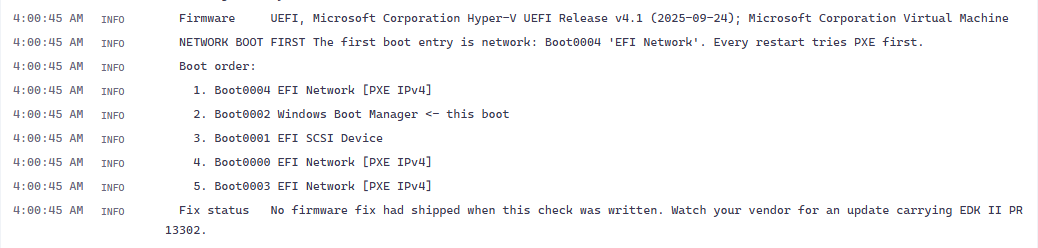
And the Ubuntu VM as it normally is, with network boot behind the disk:
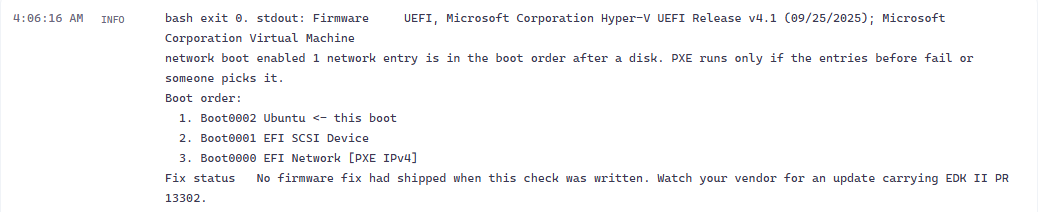
It can’t tell you whether your firmware has the fix, because no vendor had shipped one when I wrote this. It reports the BIOS vendor, version and date so you can match them against your vendor’s advisory when it shows up.
What to do until the firmware update
- Turn PXE off where nothing needs it. That means the network stack or PXE option in firmware setup, not just the boot order. Editing the boot order with
bcdeditorefibootmgrchanges when PXE runs, not whether it can. - Where you do need PXE, keep it on an isolated provisioning network. The packet has to reach the machine while it boots, and a filtered install VLAN stops it. Blocking unexpected ICMP errors aimed at booting machines helps too.
- Watch for
BootNext. A machine an imaging tool has queued for a reimage is exposed on its next restart, even if network boot is normally last. - Watch your hardware vendor’s support page for a firmware update that mentions CVE-2026-97631. That’s the actual fix.
Doing this across a fleet
The RFF Script Library has two entries for this:
- UEFI Network Boot (CVE-2026-97631) - Exposure Check for Windows
- UEFI Network Boot (CVE-2026-97631) - Exposure Check (Linux), which reads the variables straight from the kernel, so it doesn’t need
efibootmgrinstalled
Both report one of six verdicts per machine: booted from network, network boot next, network boot first, network boot enabled, no network boot, or legacy BIOS (legacy PXE runs the network card’s own ROM, not this driver). They list the boot order with the network entries marked, plus the BIOS vendor, version and date. Neither changes anything.
RFF is free for your first 100 endpoints: getrff.com.
Sources
- TianoCore: GHSA-99cj-7hg9-mp4m, Pre-boot RCE in EDK II PXE driver
- Techzine: Critical UEFI vulnerability threatens servers during network-based boot (Intel’s statement)
- Hardware Busters: EDK II vulnerability lets a rogue ICMP packet run code before Secure Boot
- GBHackers: Critical UEFI firmware flaw
- UEFI specification, section 3.1 (Boot Manager):
BootOrder,BootNext,BootCurrentand theEFI_LOAD_OPTIONformat the check parses
Comments
Comments use GitHub Discussions, so you'll need a GitHub account to post. Corrections are especially welcome.