Outlook zero-day CVE-2026-124194: one Office file can hand over a user’s NTLM hash
If someone opens a crafted Office file, Outlook can send their NTLMv2 hash to an attacker, who can then use it to sign in as them. That’s CVE-2026-124194, and Microsoft released a fix on November 10 - according to them, it’s already being exploited. The Preview Pane isn’t a way in (Tenable via Security Boulevard). CISA added it to the KEV catalog the same day, with a November 24 due date for federal agencies.
Microsoft scores it 6.5 and rates it Moderate, so it’s easy to scroll past in a release of more than a thousand CVEs. It’s the only one in this release that’s being exploited.
Which builds are fixed
The fix is for Microsoft 365 Apps for Enterprise and Office LTSC 2021 and 2024 (32- and 64-bit). All of them are Click-to-Run, and the fix is a different build on each update channel (Microsoft 365 Apps security updates, November 10):
| Channel | Version | Fixed build |
|---|---|---|
| Current Channel (and Office 2021/2024 retail) | 2610 | 16.0.20527.20196 |
| Monthly Enterprise Channel | 2610 / 2609 / 2608 | 20527.20194 / 20430.20264 / 20326.20320 |
| Semi-Annual Enterprise Channel | 2610 / 2609 / 2608 | 20527.20192 / 20430.20262 / 20326.20318 |
| Office LTSC 2024 (volume licensed) | 2408 | 16.0.17932.21140 |
| Office LTSC 2021 (volume licensed) | 2108 | 16.0.14334.21048 |
Two things trip people up here:
- The version number alone isn’t enough. Version 2610 is fixed at 20527.20196 on Current Channel but at 20527.20192 on Semi-Annual Enterprise. A build that’s fixed on one channel can be one revision short on another, so you need to know which channel each machine is on. Click-to-Run keeps the channel in the registry, as a GUID at the end of the
UpdateChannelandCDNBaseUrlURLs underHKLM\SOFTWARE\Microsoft\Office\ClickToRun\Configuration. If Group Policy sets the channel, that’s the one Office follows. - Outlook 2016 and Office 2019 aren’t on Microsoft’s list. Tenable’s write-up names Outlook 2016 as affected, but Microsoft’s record for the CVE doesn’t include it or Office 2019. Both went out of support in October 2025, so neither gets a November fix either way.
New Outlook (olk.exe) isn’t on Microsoft’s list.
What I found on my desktop
I ran the check on my own desktop first. It’s on Current Channel and it was on 16.0.20527.20150, so vulnerable.
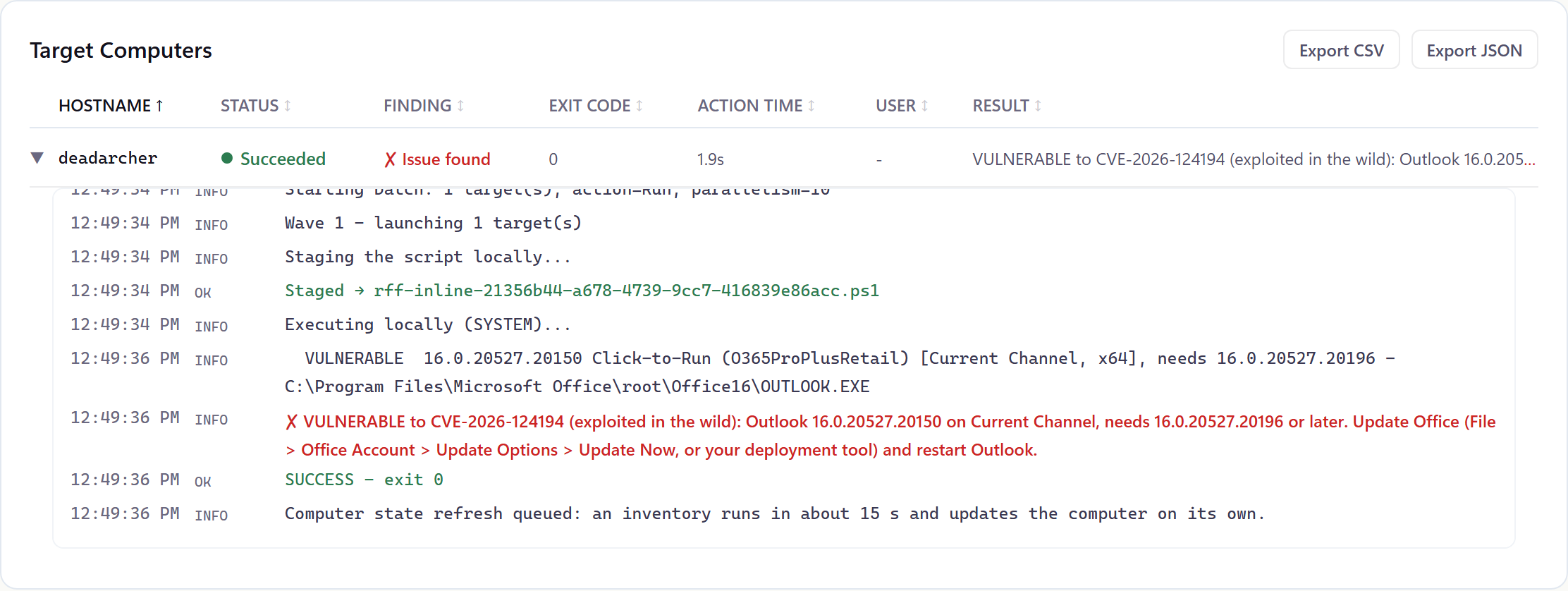
Then I started the update without closing anything. Excel was open, so Click-to-Run downloaded 16.0.20527.20196, recorded it as UpdateToVersion and waited, the way it always does for open Office apps. Outlook wasn’t running, so closing Outlook alone wouldn’t have helped. Until Excel closed, the machine reported .20150, and the check showed the fix as downloaded but not installed.
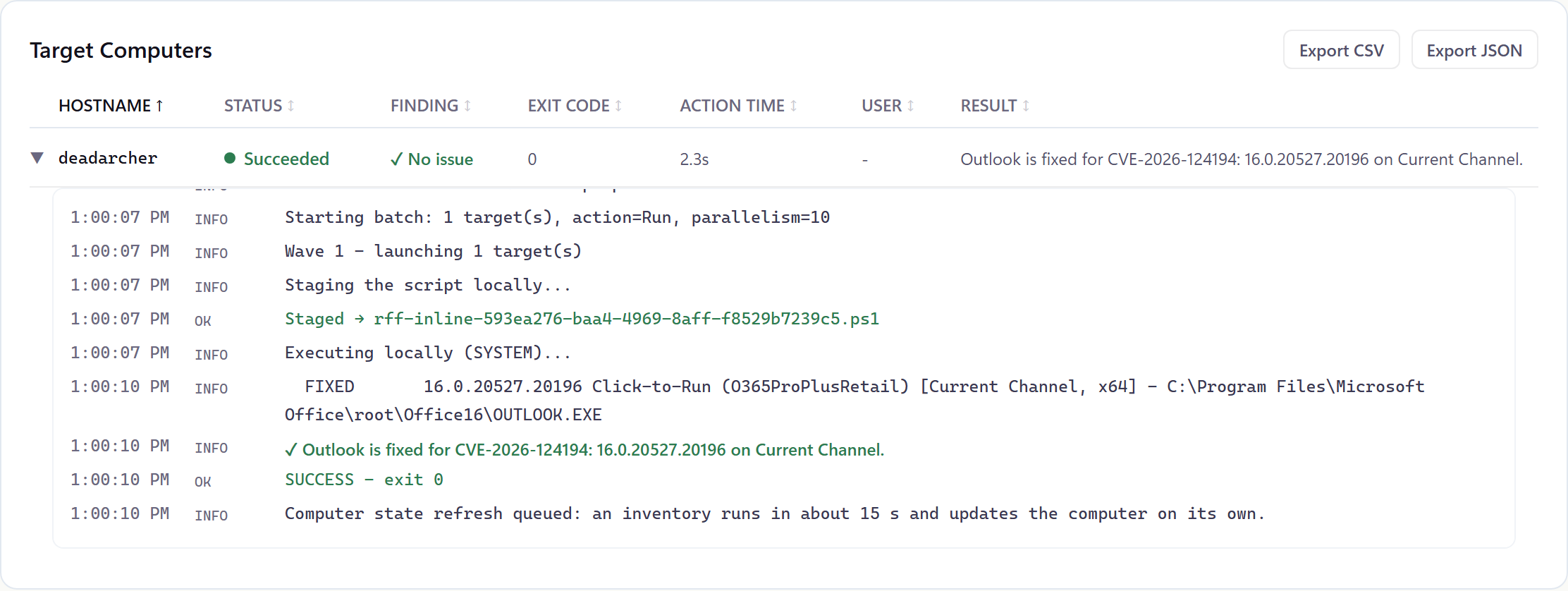
Once I closed Excel, the update installed in about nine minutes. The new OUTLOOK.EXE was on disk a little before Office’s own version number changed to match.
Check one machine
In PowerShell:
$c = Get-ItemProperty 'HKLM:\SOFTWARE\Microsoft\Office\ClickToRun\Configuration'
$c.VersionToReport          # the build Office is running
$c.UpdateChannel            # the channel GUID is the last part of the URL
(Get-ItemProperty 'HKLM:\SOFTWARE\Microsoft\Office\ClickToRun\Updates').UpdateToVersion   # downloaded, waiting to install
The channel GUIDs you’re most likely to see:
| GUID | Channel |
|---|---|
492350f6-3a01-4f97-b9c0-c7c6ddf67d60 | Current Channel |
55336b82-a18d-4dd6-b5f6-9e5095c314a6 | Monthly Enterprise Channel |
7ffbc6bf-bc32-4f92-8982-f9dd17fd3114 | Semi-Annual Enterprise Channel |
7983bac0-e531-40cf-be00-fd24fe66619c | Office LTSC 2024 |
5030841d-c919-4594-8d2d-84ae4f96e58e | Office LTSC 2021 |
If UpdateToVersion is newer than VersionToReport, the fix is on the machine and waiting for every Office app to close.
What to do
- Get every Click-to-Run install to its channel’s fixed build. In Office it’s File > Office Account > Update Options > Update Now. From the command line it’s
OfficeC2RClient.exe /update userinC:\Program Files\Common Files\microsoft shared\ClickToRun. - Make sure the update actually installs. It waits until every Office app is closed, Excel and Word included.
- Until a machine is fixed, treat Office files from outside the organization with extra suspicion.
- Find the MSI Outlook 2016 and Office 2019 installs and plan their replacement. They’re out of support.
Doing it with RFF
The RFF Script Library has a CVE-2026-124194 check for Windows. It reads the Click-to-Run version and the update channel (Group Policy first, then UpdateChannel, then CDNBaseUrl) and compares the build with Microsoft’s fixed build for that channel. When it can’t tell the channel, it uses the highest fixed revision for that build, so an unknown channel can read vulnerable when it isn’t, never the other way round. It also reports a fix that’s downloaded but not installed, and which Office apps are holding it up. MSI Outlook 2016 and Office 2019 come back as “not listed” rather than fixed. The two screenshots above are that check, run through RFF on my own desktop.
RFF is free for your first 100 endpoints: getrff.com.
Sources
- Microsoft Security Response Center, CVE-2026-124194: affected products, exploited, CVSS 6.5
- Release notes for Microsoft 365 Apps security updates: the fixed build on each channel, November 10, 2026
- Tenable via Security Boulevard: the NTLMv2 hash disclosure, the Preview Pane note
- SecurityWeek: the November release and the exploited Outlook flaw
- CISA Known Exploited Vulnerabilities catalog: added November 10, due November 24
Comments
Comments use GitHub Discussions, so you'll need a GitHub account to post. Corrections are especially welcome.