Chrome zero-day CVE-2026-125350: find the copies still running the old build
On November 9 Google shipped a Chrome update for CVE-2026-125350, a high-severity use-after-free in Chrome’s XML code, reported anonymously on November 6. Google’s post says it “is aware that an exploit for CVE-2026-125350 exists in the wild.” SecurityWeek counts it as the eighth exploited Chrome zero-day this year.
The fix is in these builds:
| Channel | Fixed build |
|---|---|
| Stable, Windows and macOS | 157.0.8103.50 / .51 |
| Stable, Linux | 157.0.8103.50 |
| Extended Stable | 156.0.8078.96 |
Anything older is vulnerable. Beta, Dev and Canary are already past 157.
Edge isn’t fixed yet. Microsoft’s Edge security release notes say: “Microsoft is aware of the recent exploits existing in the wild. We are actively working on releasing a security fix.”
Chrome keeps running the old build until it restarts
Chrome updates itself, so it’s tempting to call this done. The catch is that the update only takes effect when Chrome restarts, and a lot of people never close their browser.
- Windows. The updater downloads the new version while Chrome runs and leaves it as
new_chrome.exenext tochrome.exe. It swaps in the next time Chrome starts. Until then, the browser in front of the user is the old one. - macOS. The update replaces the app bundle in place, so the version in
Info.plistsays fixed. The running Chrome is still the old framework until it’s relaunched. - Linux.
aptordnfreplaces the files under the running browser. The package database says fixed. The running process is still the old binary, and/proc/<pid>/exeshows it as(deleted).
So a scanner or an inventory that reads the file version or the package version calls these machines fixed while the vulnerable build is still running.
Per-user installs and Extended Stable need a separate look:
- Per-user Chrome. Chrome can install into a user’s own profile (
AppData\Local\Google\Chromeon Windows,~/Applicationson a Mac) without admin rights. It updates only while that user runs it. A profile nobody has signed into for months can still have a months-old build, and an inventory that reads only the machine-wide install lists just that one copy. - Extended Stable. If you pin Chrome to Extended Stable, the fixed build is 156.0.8078.96, not 157. A 156 build isn’t automatically behind.
What I found
I checked my own machines first. My Mac had 157.0.8103.40 on disk, already behind the fix, and the app bundle was dated November 2. It was still running 156.0.8078.80. So Chrome had downloaded an update a week earlier and never restarted onto it. My Windows desktop was running 157.0.8103.39 and hadn’t picked up the fix yet.
Then I reproduced it on purpose on my Ubuntu lab VM, which had Chrome 155.0.8059.79. I started Chrome as a normal user, then upgraded the package with apt while it ran. dpkg said 157.0.8103.50 straight away. The running browser’s /proc/<pid>/exe read /opt/google/chrome/chrome (deleted), and when the check asked that still-open binary for its version, it answered 155.0.8059.79 - closing Chrome was the fix.
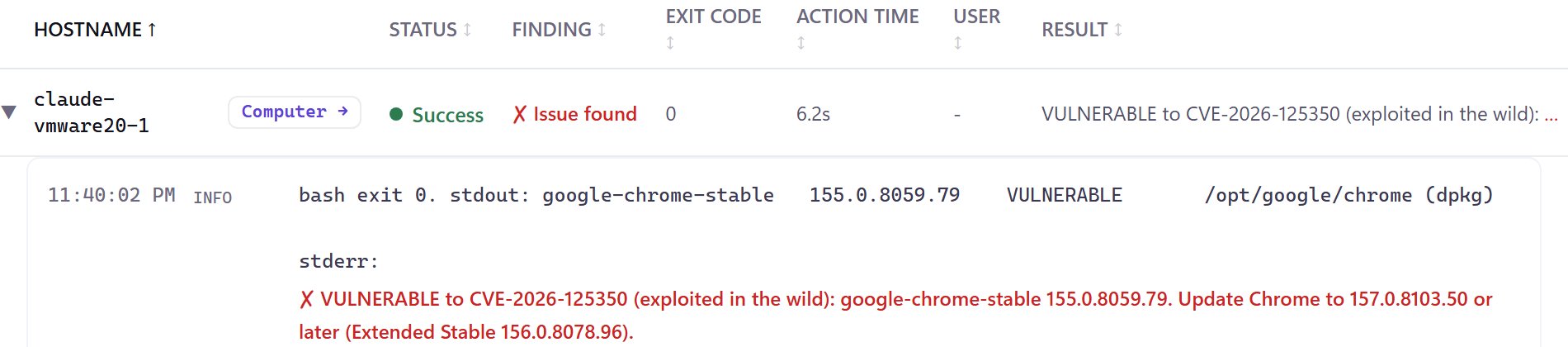
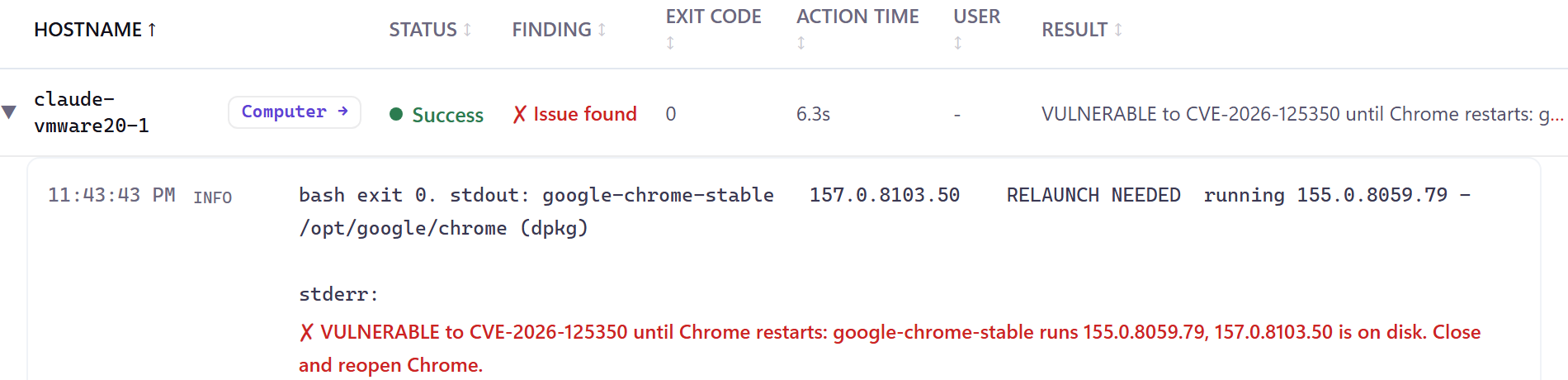
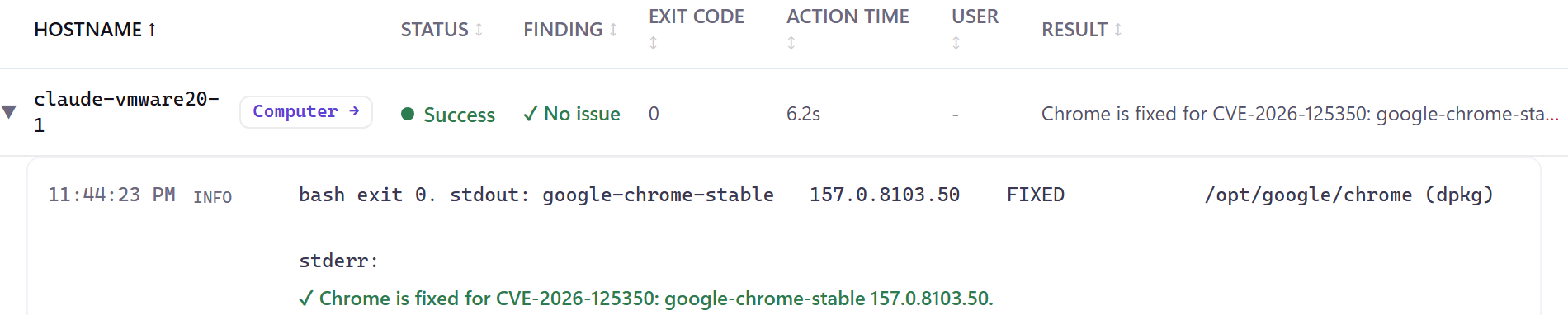
For contrast, my lab domain controller, a Windows Server 2025 VM where nobody keeps Chrome open, was already on 157.0.8103.50 when I checked it the same night. With no browser running, the update went straight in.
On Windows, a downloaded update waits in Chrome’s Application folder as new_chrome.exe. When Chrome restarts, it replaces chrome.exe. I didn’t test that in the lab, but the commands below check for it.
Check one machine
On Windows, in PowerShell:
$app = 'C:\Program Files\Google\Chrome\Application'
# On disk: the newest version folder is what Chrome runs after its next restart
Get-ChildItem $app -Directory | Where-Object Name -match '^\d+(\.\d+){3}$' |
    Sort-Object { [version]$_.Name } | Select-Object -Last 1 -ExpandProperty Name
# An update staged and waiting for a restart?
Test-Path "$app\new_chrome.exe"
# Running: the version folder of the chrome.dll each open browser loaded
Get-Process chrome -ErrorAction SilentlyContinue |
    ForEach-Object { $_.Modules | Where-Object ModuleName -eq 'chrome.dll' } |
    ForEach-Object { Split-Path (Split-Path $_.FileName) -Leaf } | Sort-Object -Unique
Run it elevated. Get-Process needs admin rights to read the modules of another user’s Chrome, so an unelevated prompt skips those browsers. For a per-user copy, point $app at that profile’s AppData\Local\Google\Chrome\Application and run it again.
On a Mac:
defaults read "/Applications/Google Chrome.app/Contents/Info" CFBundleShortVersionString
ps -axww -o command | grep -oE 'Google Chrome Framework\.framework/Versions/[0-9.]+' | sort -u
The first line is the version on disk, the second the version (or versions) running. On my Mac they printed 157.0.8103.40 and Google Chrome Framework.framework/Versions/156.0.8078.80. Keep the ww: it stops ps cutting long paths to the width of your Terminal window.
On Linux:
dpkg-query -W google-chrome-stable 2>/dev/null || rpm -q google-chrome-stable
ls -l /proc/[0-9]*/exe 2>/dev/null | grep 'google/chrome.*(deleted)'
Any line from the second command is a Chrome still running a build the package update has already replaced.
What to do
- Update Chrome to 157.0.8103.50 or later, or 156.0.8078.96 on Extended Stable.
- Restart it everywhere it’s running. Until it restarts, the fix isn’t running.
- Make Chrome enforce the restart next time. The
RelaunchNotificationpolicy set to2makes the relaunch required, andRelaunchNotificationPeriodsets how long users get, in milliseconds (the default is 7 days, and CIS recommends 1 day,86400000). On Windows that’s two DWORDs underHKLM\SOFTWARE\Policies\Google\Chrome. - Find the per-user copies. Update them, or remove them and point those users at the machine-wide install.
- Watch for Microsoft’s Edge fix, and restart Edge the same way when it lands.
Doing it with RFF
The RFF Script Library has a CVE-2026-125350 check for Windows, macOS and Linux. Each one reports every copy of Chrome as fixed, vulnerable, or RELAUNCH NEEDED, which means fixed on disk but still running an old build, and counts as vulnerable. On Windows it reads the machine-wide install and every profile’s per-user Chrome, running or not, the version folders and a staged new_chrome.exe, and the chrome.dll each open browser loaded. On macOS it reads Chrome, Beta, Dev and Canary in /Applications and each user’s folders, and the framework version that’s running. On Linux it reads dpkg, rpm and the system Flatpak, and finds a running Chrome whose binary the package update replaced. The results above are those checks, run on my own Mac, the Ubuntu lab VM and the lab DC.
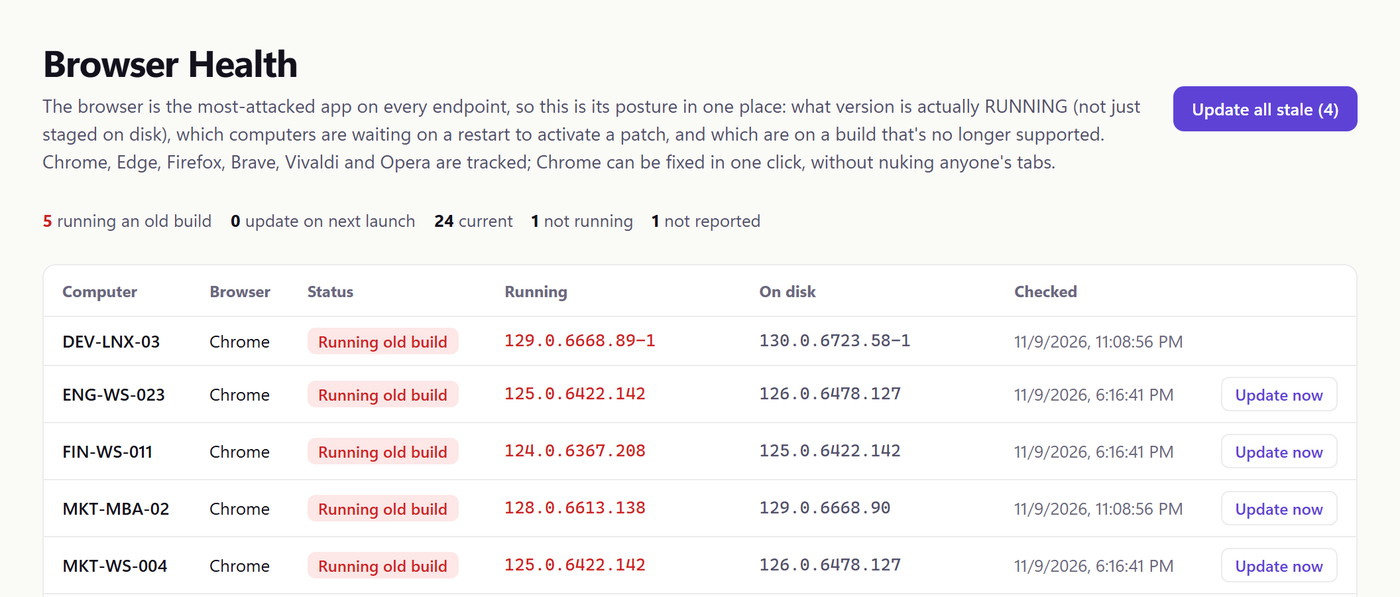
For the whole fleet, all the time, there’s Browser Health. It shows the Chrome version each computer is running next to the one on disk, on Windows, macOS and Linux, and does the same for Edge, Firefox, Brave, Vivaldi and Opera. On Windows and macOS its Update button closes Chrome gracefully and reopens it on the user’s tabs. If Chrome is showing a “close all tabs?” prompt or has an unsaved form, the update leaves it open and tries again later.
Software Sprawl answers the other question, how many Chrome builds you’re running at once and which computers are on each. It’s built from the software inventory RFF already collects.
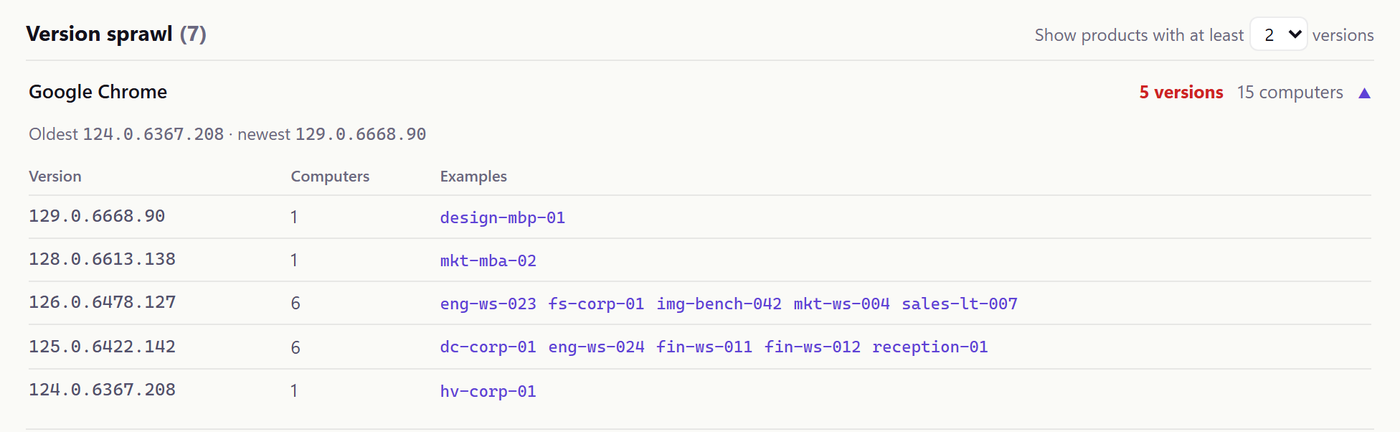
Both pages are in the live demo, a sample fleet with no account needed.
RFF is free for your first 100 endpoints: getrff.com.
Sources
- Chrome Releases, Stable Channel Update for Desktop, November 9, 2026: the CVE, the fixed builds, “exists in the wild”
- SecurityWeek: the eighth exploited Chrome zero-day of 2026
- Microsoft Edge security release notes: Edge fix in progress
- Chrome Enterprise: notify users to relaunch: RelaunchNotification and RelaunchNotificationPeriod
- CIS Google Chrome benchmark, update notification period: the 1-day recommendation
Comments
Comments use GitHub Discussions, so you'll need a GitHub account to post. Corrections are especially welcome.