How to audit the 2023 Secure Boot certs across a Windows fleet
Scripts you can run right now to find out which machines took the new certificates and which ones didn’t. No agent, no account, nothing leaves the box.
Microsoft’s Secure Boot certificates from 2011 are aging out through 2026, and machines need the 2023 replacements in their firmware to keep trusting boot components. If you run a Windows fleet you’ve probably already got this on a list somewhere.
We shipped a careful way to apply the update back in June. Since then we’ve spent a while on the other half of the problem - proving it landed - and the documented thing everyone reports on has a quiet blind spot. Here’s what’s behind it, and the scripts to check your own machines.
Check one machine right now
Run this as administrator. It reads only - nothing is changed, nothing is sent anywhere.
$X509 = [guid]'a5c059a1-94e4-4aa7-87b5-ab155c2bf072'

function Get-DbCerts {
    try { $bytes = (Get-SecureBootUEFI -Name db -ErrorAction Stop).Bytes }
    catch { return $null }          # not UEFI, or not elevated

    $certs = @(); $off = 0
    while ($off + 28 -le $bytes.Length) {
        $type     = [guid]::new([byte[]]$bytes[$off..($off+15)])
        $listSize = [BitConverter]::ToUInt32($bytes, $off+16)
        $hdrSize  = [BitConverter]::ToUInt32($bytes, $off+20)
        $sigSize  = [BitConverter]::ToUInt32($bytes, $off+24)
        if ($listSize -lt 28 -or $listSize -gt ($bytes.Length - $off)) { break }
        if ($type -eq $X509 -and $sigSize -gt 16) {
            $start = $off + 28 + $hdrSize
            for ($i = 0; $i -lt [int](($listSize - 28 - $hdrSize) / $sigSize); $i++) {
                $o = $start + ($i * $sigSize)
                if ($o + $sigSize -gt $bytes.Length) { break }
                try {
                    $c = [Security.Cryptography.X509Certificates.X509Certificate2]::new(
                             [byte[]]$bytes[($o+16)..($o+$sigSize-1)])
                    $certs += [pscustomobject]@{ Subject  = $c.GetNameInfo('SimpleName',$false)
                                                 NotAfter = $c.NotAfter }
                } catch { }
            }
        }
        $off += $listSize
    }
    $certs
}

$bios  = Get-CimInstance Win32_BIOS
$certs = Get-DbCerts

Write-Host "`n  $env:COMPUTERNAME"
Write-Host "  BIOS $($bios.SMBIOSBIOSVersion)  ($($bios.ReleaseDate.ToString('yyyy-MM-dd')), $([int]((Get-Date) - $bios.ReleaseDate).TotalDays) days old)`n"

if ($null -eq $certs) { Write-Host "  COULD NOT READ db - run elevated on a UEFI machine." -ForegroundColor Yellow; return }

foreach ($c in ($certs | Sort-Object NotAfter)) {
    $days = [int]($c.NotAfter - (Get-Date)).TotalDays
    $col  = if ($days -lt 0) { 'Red' } elseif ($days -lt 180) { 'Yellow' } else { 'DarkGray' }
    Write-Host ("  {0,-45} {1:yyyy-MM-dd}  {2}" -f $c.Subject, $c.NotAfter,
        $(if ($days -lt 0) { "EXPIRED $([Math]::Abs($days))d ago" } else { "${days}d" })) -ForegroundColor $col
}

$has2023 = [bool]($certs | Where-Object { $_.Subject -like '*Windows UEFI CA 2023*' })
if ($has2023) { Write-Host "`n  PASS - Windows UEFI CA 2023 is in the firmware." -ForegroundColor Green }
else { Write-Host "`n  ACTION - Windows UEFI CA 2023 is NOT in the firmware. Update BIOS, then re-run." -ForegroundColor Red }

$svc = Get-ItemProperty 'HKLM:\SYSTEM\CurrentControlSet\Control\SecureBoot\Servicing' -EA SilentlyContinue
if ($svc.UEFICA2023Status) {
    Write-Host "  Windows servicing reports: $($svc.UEFICA2023Status)" -ForegroundColor DarkGray
    if ($svc.UEFICA2023Status -eq 'Updated' -and -not $has2023) {
        Write-Host "  ^ servicing says Updated but the cert isn't there - firmware refused it." -ForegroundColor Red
    }
}
Here’s what it printed on a machine in our lab:
  WKSTN-04
  BIOS 2202  (2020-07-13, 2258 days old)
  Secure Boot: OFF

  Microsoft Corporation UEFI CA 2011            2026-06-27  EXPIRED 83d ago
  Microsoft Windows Production PCA 2011         2026-10-19  31d
  ASUSTeK MotherBoard SW Key Certificate        2031-12-26  1925d
  ASUSTeK Notebook SW Key Certificate           2031-12-26  1925d
  Canonical Ltd. Master Certificate Authority   2042-04-11  5684d

  ACTION - Windows UEFI CA 2023 is NOT in the firmware.
  Windows servicing reports: NotStarted
A BIOS from July 2020, no 2023 certificate, and the Windows bootloader signer has a month left on it. That machine’s a fine desktop and it’s been patched the whole time.
Why the registry check isn’t enough
Windows keeps its own record of the update:
HKLM\SYSTEM\CurrentControlSet\Control\SecureBoot\Servicing
    UEFICA2023Status : REG_SZ    NotStarted | InProgress | Updated
    UEFICA2023Error  : REG_DWORD  0 = clean
It’s documented, it’s a registry read, and it’s what most scripts and RMM checks use. Ours included. You get Updated back and you move on.
The catch is that the value is Windows reporting on its own attempt. Windows asks the firmware to take the certificate, and the firmware’s a separate piece of software that can say no. When it does, nothing in that key changes. You still get Updated, and you’ve got a machine showing green on every dashboard you own with none of the certs it needs.
What’s actually in db
The allowed-signature database is a UEFI variable called db. It isn’t a list of names and it isn’t text, which is the first thing that’ll trip you up. It’s a packed sequence of EFI_SIGNATURE_LIST structures:
offset  size  field
0       16    SignatureType        GUID
16       4    SignatureListSize    UINT32   // the whole list, header included
20       4    SignatureHeaderSize  UINT32
24       4    SignatureSize        UINT32   // per entry, owner GUID included
28       n    SignatureHeader
28+n    ...   Signatures[]                  // each: 16-byte owner GUID + payload
When SignatureType is EFI_CERT_X509_GUID each payload is a DER certificate. When it’s EFI_CERT_SHA256_GUID each payload is a 32-byte hash, which is what dbx is mostly full of.
Our first attempt decoded the blob as text and looked for “Microsoft”. It found nothing, on a machine with six certificates in it, because there’s no text in there to find. That’s why the script above walks the structure.
Sweep the whole fleet
Same parse, wrapped for remoting, with the fields you’d actually sort by. Save it as sb-sweep.ps1:
.\sb-sweep.ps1 -ComputerName (Get-Content .\machines.txt) |
    Export-Csv .\secureboot.csv -NoTypeInformation
It returns one row per machine:
| Column | Why you want it |
|---|---|
Has2023CA | the answer. False is your work queue |
DbReadable | False means the check failed, which isn’t the same as a missing cert |
BiosVersion / BiosDate / BiosAgeDays | group by these and the pattern shows up immediately |
OldestMsExpiry | sorts the fleet by how long you’ve got |
ServicingStatus | compare against Has2023CA to find the disagreements |
SecureBootOn | a machine with Secure Boot off is a different conversation |
The full script is at the bottom of this post. Once you’ve got the CSV, the query that matters is the cross-tab:
Import-Csv .\secureboot.csv |
    Where-Object { $_.DbReadable -eq 'True' } |
    Group-Object Has2023CA, BiosVersion |
    Sort-Object Name | Format-Table Count, Name -AutoSize
And the one that finds the machines lying to you:
Import-Csv .\secureboot.csv |
    Where-Object { $_.ServicingStatus -eq 'Updated' -and $_.Has2023CA -eq 'False' }
Anything in that second list has a firmware problem, not a patching problem.
Two machines, same afternoon
Both fully patched, both current Windows, measured about an hour apart.
HP EliteOne 800 G5 - BIOS R11 Ver. 02.26.00, released 2026-05-03 (138 days old)
Windows UEFI CA 2023                          2035-06-13
Microsoft UEFI CA 2023                        2038-06-13
Microsoft Option ROM UEFI CA 2023             2038-10-26
HP UEFI Secure Boot DB 2017                   2033-01-16
Microsoft Windows Production PCA 2011          2026-10-19
Microsoft Corporation UEFI CA 2011            2026-06-27   (expired)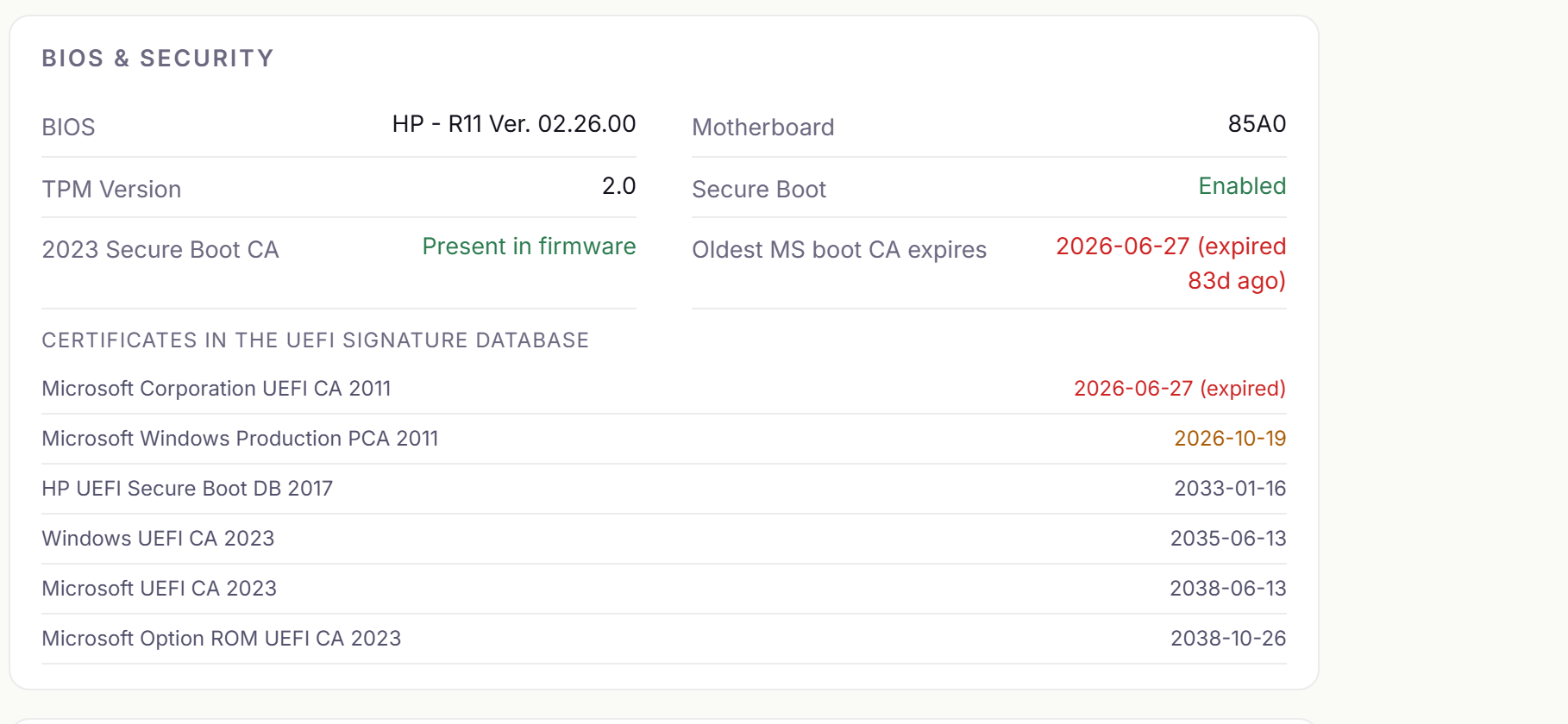
ASUS PRIME B450M-A - BIOS American Megatrends 2202, released 2020-07-13 (2,258 days old)
ASUSTeK MotherBoard SW Key Certificate        2031-12-26
ASUSTeK Notebook SW Key Certificate           2031-12-27
Canonical Ltd. Master Certificate Authority   2042-04-11
Microsoft Windows Production PCA 2011          2026-10-19
Microsoft Corporation UEFI CA 2011            2026-06-27   (expired)

Windows UEFI CA 2023                          MISSING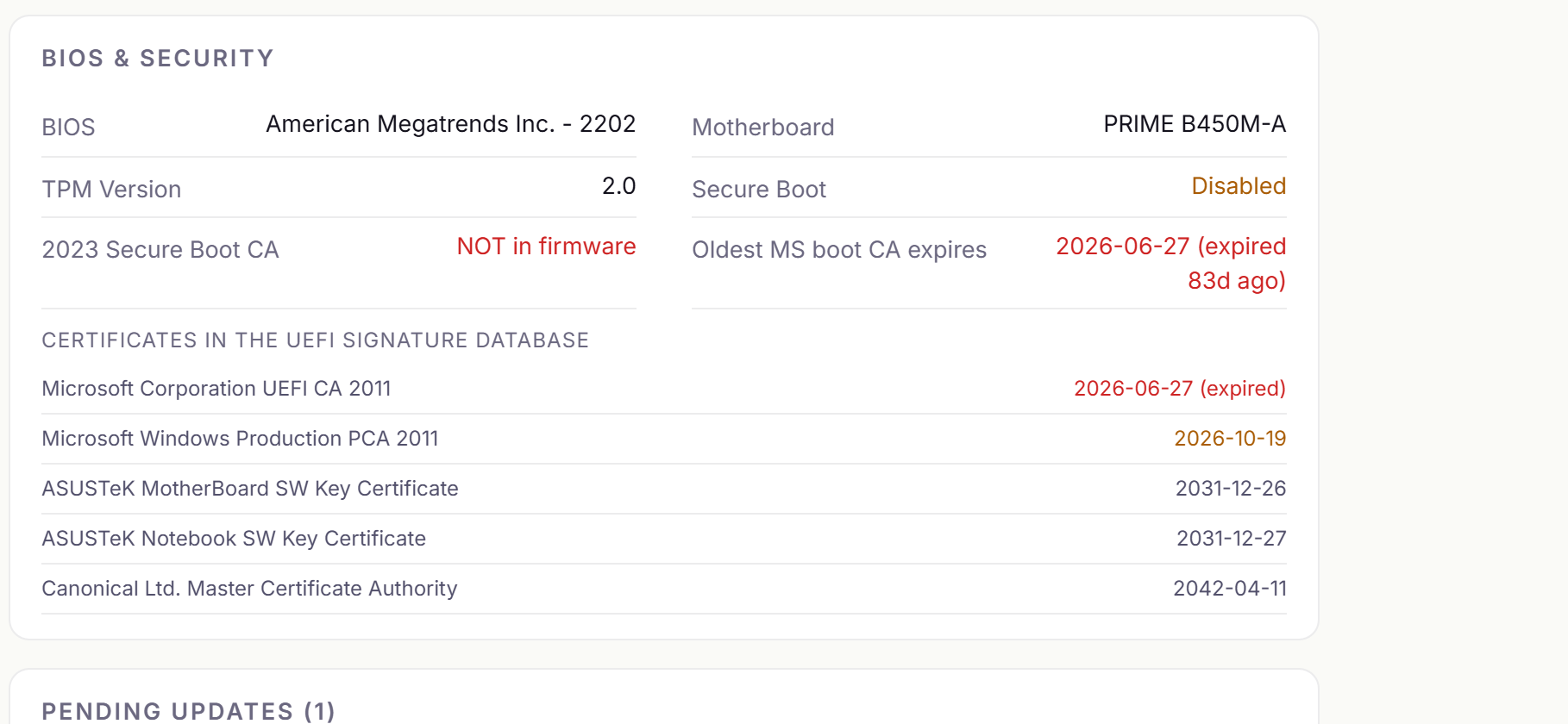
138 days versus 2,258 days. Same patches, same day, and the only thing that differs is how old the firmware is. That’s the whole finding, and it’s why BiosAgeDays is in the sweep output.
The dates, off real hardware
| Certificate | Expires | On 2026-09-18 |
|---|---|---|
Microsoft Corporation KEK CA 2011 | 2026-06-24 | expired 86 days ago |
Microsoft Corporation UEFI CA 2011 | 2026-06-27 | expired 83 days ago |
Microsoft Windows Production PCA 2011 | 2026-10-19 | 31 days left |
Windows UEFI CA 2023 | 2035-06-13 | replaces the PCA above |
Microsoft Corporation KEK 2K CA 2023 | 2038-03-02 | replaces the KEK above |
Microsoft Windows Production PCA 2011 is the one that signs the Windows bootloader. For the authoritative picture of what expires when and what Microsoft is shipping to replace it, start with the certificate-expiration and CA-update overview and the IT-pro Secure Boot playbook for the certificates expiring in 2026.
Two things that’ll bite you if you automate this
Both of these cost us time, and both are the kind of bug that doesn’t announce itself.
1. db isn’t in the global variable namespace
If you’re calling the Win32 API directly instead of using Get-SecureBootUEFI: PK and KEK live under EFI_GLOBAL_VARIABLE, 8be4df61-93ca-11d2-aa0d-00e098032b8c. db and dbx don’t - they’re under EFI_IMAGE_SECURITY_DATABASE, d719b2cb-3d3a-4596-a3bc-dad00e67656f.
Use the wrong one and GetFirmwareEnvironmentVariableW hands you ERROR_ENVVAR_NOT_FOUND (203). We got that 203 on a box that Get-SecureBootUEFI read 6,322 bytes out of a second later, which is a confusing ten minutes if you’re assuming the machine’s at fault.
2. SeSystemEnvironmentPrivilege is there but switched off
You need that privilege to read firmware variables. LocalSystem holds it, and it’s disabled in the token by default. Having a privilege and having it enabled aren’t the same thing:
OpenProcessToken(GetCurrentProcess(), TOKEN_ADJUST_PRIVILEGES | TOKEN_QUERY, &h);
LookupPrivilegeValue(NULL, SE_SYSTEM_ENVIRONMENT_NAME, &luid);
tp.PrivilegeCount = 1; tp.Privileges[0].Luid = luid;
tp.Privileges[0].Attributes = SE_PRIVILEGE_ENABLED;
AdjustTokenPrivileges(h, FALSE, &tp, 0, NULL, NULL);
// AdjustTokenPrivileges returns TRUE even when it assigned nothing.
// GetLastError() == ERROR_NOT_ALL_ASSIGNED is the real answer.
Neither one throws. You get an empty result back and nothing says why, which your code then reports as “this machine has no Secure Boot data” - and that reads to an operator exactly like “this machine has no 2023 certificate”. We’d have shipped a check that came back clean on the entire fleet while reading nothing at all, and there’s no symptom to notice. You’d find out in October.
That’s why DbReadable is a separate column in the sweep. “Couldn’t tell” and “cert is missing” have to look different or you’ve built the same bug again.
What to do with the results
- Sweep
dbacross the fleet. The firmware, not the registry value. - Group by
BiosVersionandBiosDate. The stale cluster is your queue, and it’ll usually be a handful of models rather than scattered machines. - Update firmware on anything with
Has2023CA = False. Vendor tooling - HP Image Assistant, Dell Command Update, Lenovo System Update - is the practical route at scale. - Re-run the sweep. Firmware update and certificate arrival are two separate events, and the second one’s the one that counts.
The fleet that gets caught by this isn’t the unpatched one. Windows Update is somebody’s job everywhere. Firmware usually isn’t anybody’s, and that’s the entire difference between those two machines above.
The full sweep script
Tested on Windows PowerShell 5.1 and PowerShell 7. Read-only.
[CmdletBinding()]
param([string[]] $ComputerName = @($env:COMPUTERNAME), [pscredential] $Credential)

$scan = {
    $X509 = [guid]'a5c059a1-94e4-4aa7-87b5-ab155c2bf072'
    $certs = @(); $readOk = $true
    try {
        $bytes = (Get-SecureBootUEFI -Name db -ErrorAction Stop).Bytes
        $off = 0
        while ($off + 28 -le $bytes.Length) {
            $type     = [guid]::new([byte[]]$bytes[$off..($off+15)])
            $listSize = [BitConverter]::ToUInt32($bytes, $off+16)
            $hdrSize  = [BitConverter]::ToUInt32($bytes, $off+20)
            $sigSize  = [BitConverter]::ToUInt32($bytes, $off+24)
            if ($listSize -lt 28 -or $listSize -gt ($bytes.Length - $off)) { break }
            if ($type -eq $X509 -and $sigSize -gt 16) {
                $start = $off + 28 + $hdrSize
                for ($i = 0; $i -lt [int](($listSize - 28 - $hdrSize) / $sigSize); $i++) {
                    $o = $start + ($i * $sigSize)
                    if ($o + $sigSize -gt $bytes.Length) { break }
                    try {
                        $c = [Security.Cryptography.X509Certificates.X509Certificate2]::new(
                                 [byte[]]$bytes[($o+16)..($o+$sigSize-1)])
                        $certs += [pscustomobject]@{ S = $c.GetNameInfo('SimpleName',$false); E = $c.NotAfter }
                    } catch { }
                }
            }
            $off += $listSize
        }
    } catch { $readOk = $false }

    $bios = Get-CimInstance Win32_BIOS
    $svc  = Get-ItemProperty 'HKLM:\SYSTEM\CurrentControlSet\Control\SecureBoot\Servicing' -EA SilentlyContinue
    $ms   = $certs | Where-Object { $_.S -match 'Microsoft|Windows' }

    # Compute these BEFORE the hashtable. PowerShell 5.1 rejects try/catch as an expression
    # inside a hash literal ("The hash literal was incomplete"); only PS7 allows it.
    $sbOn = $null; try { $sbOn = Confirm-SecureBootUEFI } catch { $sbOn = $null }
    $has2023 = $null
    if ($readOk) { $has2023 = [bool]($certs | Where-Object { $_.S -like '*Windows UEFI CA 2023*' }) }
    $oldestMs = $null
    if ($ms) { $oldestMs = ($ms | Sort-Object E | Select-Object -First 1).E.ToString('yyyy-MM-dd') }
    $biosDate = $null; $biosAge = $null
    if ($bios.ReleaseDate) {
        $biosDate = $bios.ReleaseDate.ToString('yyyy-MM-dd')
        $biosAge  = [int]((Get-Date) - $bios.ReleaseDate).TotalDays
    }

    [pscustomobject]@{
        Computer = $env:COMPUTERNAME; Model = (Get-CimInstance Win32_ComputerSystem).Model
        BiosVersion = $bios.SMBIOSBIOSVersion; BiosDate = $biosDate; BiosAgeDays = $biosAge
        SecureBootOn = $sbOn; DbReadable = $readOk; Has2023CA = $has2023
        OldestMsExpiry = $oldestMs; ServicingStatus = $svc.UEFICA2023Status; CertCount = $certs.Count
    }
}

$splat = @{ ComputerName = $ComputerName; ScriptBlock = $scan; ErrorAction = 'SilentlyContinue' }
if ($Credential) { $splat.Credential = $Credential }

# Local-only runs skip remoting, so this works on a box with WinRM disabled.
if ($ComputerName.Count -eq 1 -and $ComputerName[0] -eq $env:COMPUTERNAME) { & $scan }
else { Invoke-Command @splat }
What we changed in RFF
Our own compliance check reads the firmware now and treats UEFICA2023Status as the secondary source. When the two disagree, it reports the mismatch:
firmware db has NO 2023 CA despite Windows reporting Updated
  - firmware did not take it (check BIOS version)
If the firmware can’t be read at all it falls back to the old behavior instead of failing the machine, for the reason above. The screenshots in this post are that check on the two machines.