APT CVE-2026-109518: a network attacker can swap a verified package. Debian and Ubuntu fixes are out
Update, November 4, 19:45 UTC
Ubuntu’s fixed apt is on the mirrors now. It wasn’t at 19:10 UTC, when this post first went up, and it was at 19:43 on archive.ubuntu.com, security.ubuntu.com and us.archive.ubuntu.com, for 26.04 (3.2.1ubuntu0.1), 24.04 (2.8.4ubuntu0.1) and 22.04 (2.4.15ubuntu0.1). I updated my Ubuntu 26.04 lab VM from 3.2.0 to 3.2.1ubuntu0.1 with the commands below. If you turned retries off while waiting, update apt and then delete that file.
Debian’s APT team and Ubuntu published CVE-2026-109518 on November 4. It’s a flaw in APT, the tool that installs packages on Debian, Ubuntu and everything built on them. Ubuntu rates it High, with a CVSS 4.0 score of 7.7, and Max Justicz reported it. According to the APT advisory, a remote attacker can “bypass verification of downloaded packages using redirects and standard transient HTTP server errors that cause APT to retry downloads, leading APT to override existing hardlinks with a chosen payload.” APT checks the package, and then the attacker’s file takes its place. Packages install as root, so that’s code execution as root. There are no reports of it being used in attacks so far, and no public exploit.
Who can pull it off
The attacker has to be able to change the HTTP traffic between the machine and its mirror: a hostile network, a compromised proxy or caching mirror, or someone on the path to it. That rules out most attackers. It’s also exactly the position package signatures are meant to make harmless.
The stock mirror setup is plain HTTP on both distributions, because the signatures were the protection. My Ubuntu 26.04 lab VM had three http:// sources out of the box (the archive, security and the US mirror).
The attack also needs APT to retry failed downloads. The advisory says it “relies on the Acquire::Retries setting being set, which has only been the default since APT 2.3.2.” That covers Debian 12, Ubuntu 22.04 and everything newer, which retry 3 times by default. Older releases are only exposed if someone turned retries on, and the advisory notes that “many user scripts” did.
Which versions are fixed
| Release | Fixed apt | On the mirrors |
|---|---|---|
| Debian 13 (trixie) | 3.0.4 (DSA-6607-1) | Yes, November 4 |
| Debian 12 (bookworm) | 2.6.2 (DLA-4880-1) | Yes, November 4 |
| Ubuntu 26.10 | 3.3.3ubuntu0.1 | Listed on Launchpad (I didn’t check the mirrors) |
| Ubuntu 26.04 LTS | 3.2.1ubuntu0.1 | Yes, by 19:43 UTC November 4 |
| Ubuntu 24.04 LTS | 2.8.4ubuntu0.1 | Yes, by 19:43 UTC November 4 |
| Ubuntu 22.04 LTS | 2.4.15ubuntu0.1 | Yes, by 19:43 UTC November 4 |
Debian unstable has it in 3.3.6. Upstream also fixed every older branch (1.2.36, 1.4.12, 1.6.19, 1.8.2.4, 2.0.12, 2.2.5), but Debian 11 is out of security support, and Ubuntu’s CVE page shows no fix for 20.04 and older.
Why Ubuntu machines couldn’t see it at first. Launchpad listed all four Ubuntu fixes as published to the security pocket on November 4. But when I checked at 18:12 UTC, and again at 18:34 and 19:10, the resolute-security, noble-security and jammy-security indexes on archive.ubuntu.com, security.ubuntu.com and us.archive.ubuntu.com were all still dated November 3, 17:27 UTC, before the advisory, and none of them had a new apt. So for several hours apt-get upgrade on Ubuntu couldn’t see the fix, however many times you ran it. Debian’s security archive did have its fixes: in a fresh Debian 13 container, apt-get install --only-upgrade apt took 3.0.3 to 3.0.4, and Debian 12 went from 2.6.1 to 2.6.2.
Check one machine
dpkg-query -W apt                  # the installed version
apt-config dump Acquire::Retries   # prints nothing when it's the built-in default
apt-cache policy apt               # is a fixed version in your package lists?
An empty answer from apt-config doesn’t mean retries are off. It only prints settings someone made. On apt 2.3.2 and later the built-in default is 3. My Ubuntu 26.04 VM printed nothing and was retrying three times.
What to do
-
Update apt with retries off for the update itself, so the download that fixes the bug can’t be the one that gets swapped:
sudo apt-get -o Acquire::Retries=0 update sudo apt-get -o Acquire::Retries=0 install --only-upgrade apt dpkg-query -W apt -
If the fixed version isn’t there (an internal mirror that hasn’t synced yet, or a release with no fix, such as Debian 11), turn retries off until it is:
echo 'Acquire::Retries "0";' | sudo tee /etc/apt/apt.conf.d/99-cve-2026-109518
apt-config dump Acquire::Retries   # now prints Acquire::Retries "0";
This is my reading of the advisory, not a workaround it gives: the attack relies on retries, and this turns them off. The cost is that a download that hits a temporary mirror error fails instead of retrying, so an unattended update may need another run. Delete the file once the fixed apt is installed.
-
Look at your internal mirror or caching proxy (apt-cacher-ng and the like). Every machine behind it trusts what it serves, which makes it the best place for an attacker to sit. The fix is in the client, so patch the machines behind it too.
I tested all of this on November 4 in containers on my Rocky lab VM (podman). Debian 13 and 12 updated to the fixed apt. Ubuntu 26.04, 24.04 and 22.04 had no fix to install at that point, so turning retries off was the only change available. Debian 11, with apt 2.2.4, already had retries at 0 by default.
Doing it with RFF
The RFF Script Library has two entries for this, and the Checks library has one.
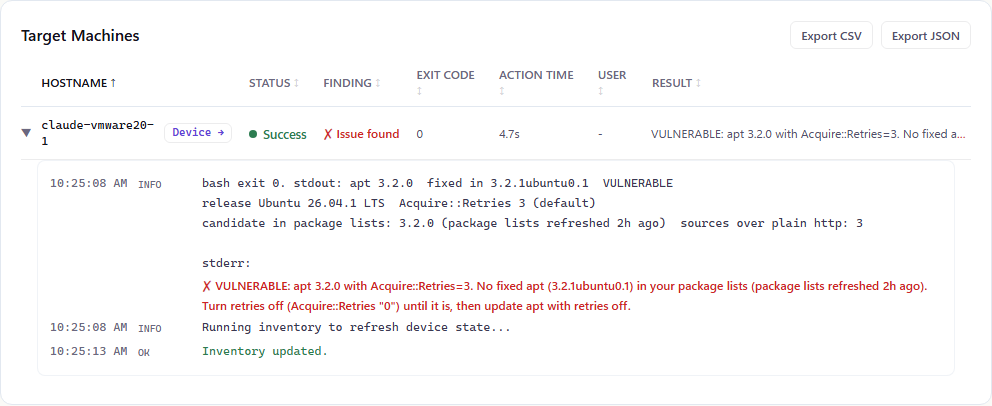
“APT package swap (CVE-2026-109518) - Version Check (Linux)” compares the installed apt with the fixed version for that release, reads the effective retry setting (including the built-in default), says whether a fixed apt is already in the package lists and how old those lists are, and counts plain-HTTP sources. It changes nothing. On my Ubuntu 26.04 lab VM, run from the Scripts page:
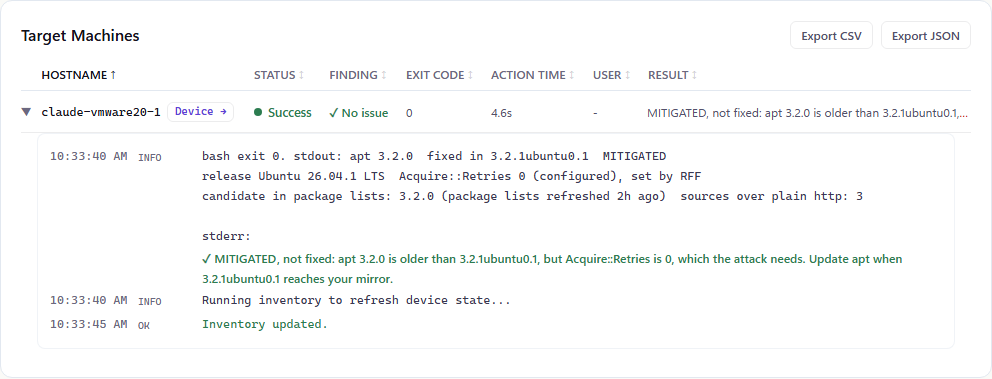
“Update APT for CVE-2026-109518 (Linux)” refreshes the package lists and installs the fixed apt with retries off, then confirms the new version. If the fix isn’t on your mirror yet, it turns retries off instead (one file in /etc/apt/apt.conf.d), and running it again later installs the fix and removes that file. It has a dry run and an undo. On the same VM, with no Ubuntu fix to install, it turned retries off, and the version check came back:
The Check, “APT fixed for CVE-2026-109518 (Linux)”, alerts on any Debian or Ubuntu machine whose apt is older than its release’s fix while retries are on. I added it from the Checks library for the VM, and it opened an alert about a minute later:

After the update entry ran, the alert closed on the next check.
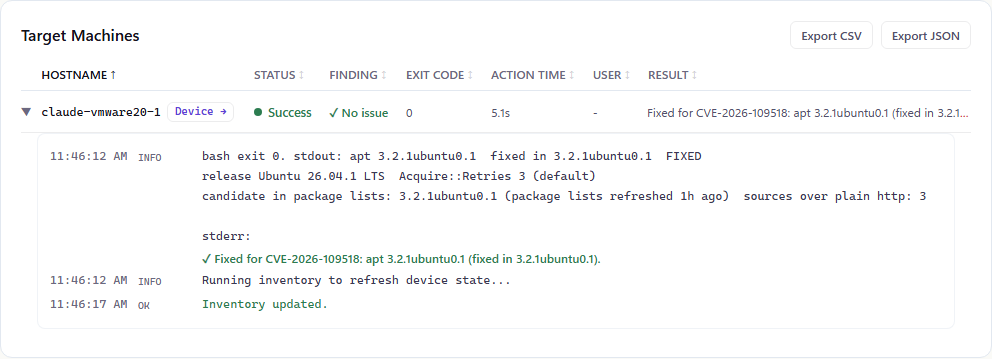
When Ubuntu’s fix reached the mirrors, I ran the same update entry again. It installed 3.2.1ubuntu0.1, turned retries back on, and the version check came back fixed:
RFF is free for your first 100 endpoints: getrff.com.
Sources
- APT security advisory (deity mailing list): the mechanism, the Acquire::Retries condition, fixed versions per branch
- Debian security tracker, CVE-2026-109518: DSA-6607-1, DLA-4880-1, fixed Debian versions
- Ubuntu CVE page: priority and CVSS 4.0 vector
- Launchpad: apt source package: Ubuntu’s fixed versions and when they were published
- The Hacker News: coverage of the advisories
Comments
Comments use GitHub Discussions, so you'll need a GitHub account to post. Corrections are especially welcome.